Why a site declines a card that has money on it
“Card declined” sounds like “not enough money”. On a prepaid card with a healthy balance, the reason is usually somewhere else. A payment has to pass several checks: the merchant’s own rules and fraud filter, 3D Secure, and finally the issuer. Any of them can say no, and the error message rarely says which one did.
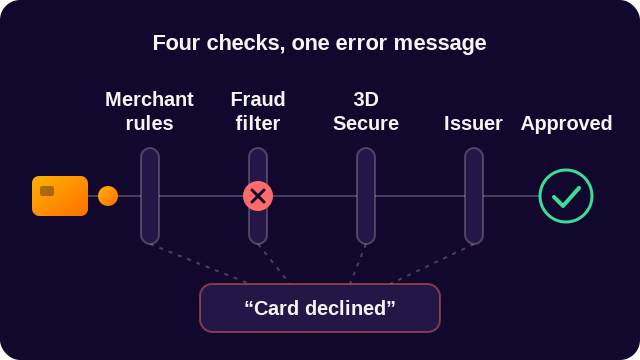
The first digits tell the merchant what kind of card it is
The first six to eight digits of a card number are its BIN, the bank identification number. Merchants and their payment processors look it up before charging. It tells them the network, the issuer, the issuing country, and whether the card is credit, debit or prepaid.
Some merchants refuse prepaid cards for certain purchases, often free trials, security deposits and rentals, because a prepaid card can’t be charged later if its balance runs out. That is a merchant rule. The payment never reaches the issuer, so your balance plays no part.
The merchant’s fraud filter runs first
Payment processors score every checkout. Typical signals are the card’s country compared with your IP address and the billing address you typed, a VPN or data-center connection, how new your account is, and how many cards were tried on it recently. A high score ends the payment on the merchant’s side. Many sites show the same generic “card declined” for this as for a real issuer decline.
Billing address checks
Some merchants, mostly in the US, the UK and Canada, compare the street number and postcode you enter with the address the issuer has on file. This is called address verification (AVS). Most merchants elsewhere don’t run it.
We don’t collect a home address when you sign up. If a merchant’s checkout keeps rejecting the billing address, stop retrying and contact support from your dashboard instead of trying other addresses.
3D Secure
The issuer may ask you to confirm a payment with 3D Secure. For an Aurum card the confirmation goes to the email on your account, so keep that inbox open while you pay. If the window times out or you close it, the payment fails. Whether you see this step depends on the merchant, which decides to start 3D Secure, and the issuer, which decides whether a code is needed. That is why the same card can pass quietly on one site and ask for a code on the next.
The issuer has the last word
If the payment gets this far, the issuer checks the card’s status, the spendable balance after any holds, the merchant’s category and country, and whether the pattern looks like fraud. Issuers commonly restrict categories such as gambling and money transfers. These rules belong to the issuer and the Visa network, and Aurum can’t switch them off for one payment.
How to tell which check said no
Open your Aurum activity. Whether the attempt shows up there tells you which side stopped it.
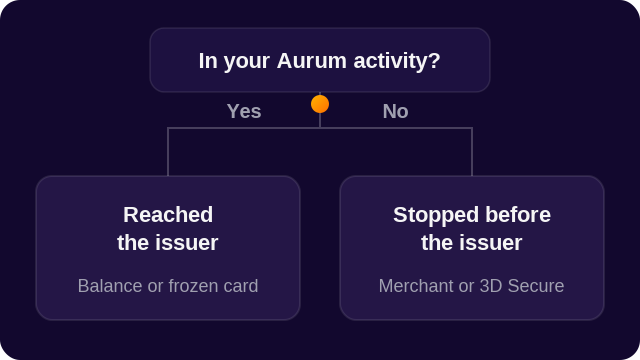
- The declined attempt is there. It reached the issuer. Check the balance after holds and whether the card is frozen.
- Nothing is there. The merchant stopped it, or 3D Secure wasn’t completed. Use your normal connection and the details you normally use, finish the 3D Secure step, or try Apple Pay or Google Pay if the site offers it. Some merchants don’t accept prepaid cards at all, and no retry will change that.
Don’t retry the same card again and again. Many declines in a short time look like card testing to the merchant, the issuer and our own fraud checks, and can get the card frozen. After two failed attempts, stop and contact support with the merchant name, the time and the amount.