Why a card payment shows as pending, and when it becomes final
A card payment looks like one event, but it is two. First the merchant asks the issuer to approve an amount and set it aside. Later, sometimes days later, the merchant sends the final amount and the issuer takes it. Most surprises on a card statement come from the gap between those two steps.
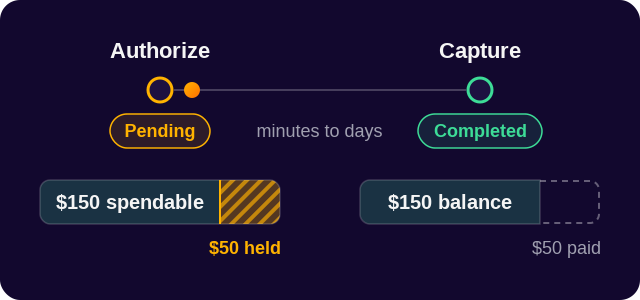
Step 1: the authorization puts money on hold
When you pay, the merchant sends an authorization request through Visa to the card issuer. The issuer checks that the card is active, that the payment passes its fraud and compliance rules, and that the balance covers the amount. If it does, the issuer approves and places a hold. No money has moved to the merchant yet, but the held amount is no longer spendable. With $200 on the card and a $50 purchase, you can spend $150 while the hold lasts.
In Aurum, this is the moment a purchase appears as pending. If transaction emails are on, this is also when we email you. The approval itself is the issuer’s decision, not ours.
Step 2: the capture makes it final
The merchant then captures the payment: it sends the final amount for the issuer to settle. Online shops often capture within minutes. Some capture only when the order ships, and hotels capture at checkout. When the capture arrives, the hold becomes the actual charge. If the amounts match, Aurum replaces the pending entry with a completed one. One purchase, one line.
Why the final amount can differ
The capture does not have to match the hold:
- A restaurant authorizes the bill and adds the tip later.
- A fuel pump or EV charger holds a fixed amount up front and captures what you used.
- A hotel or car rental holds the stay plus a deposit for extras.
- A shop that ships items separately can capture in several parts.
- A payment in another currency can settle at a slightly different exchange rate than the one used for the hold.
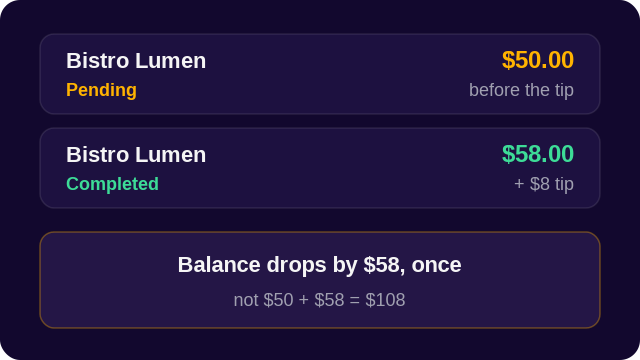
When the amounts differ, you may see both lines in Aurum, for example a $50 pending hold and a $58 completed charge after an $8 tip. Your balance comes from the issuer, which counts the purchase once. It drops by $58, not $108, so check the balance rather than adding up the lines.
When a hold doesn’t go away
If the merchant never captures, for example because an order was cancelled or a booking failed, the hold expires on its own. The issuer sets that timer. Most holds drop off within days, but hotels, car rentals and similar merchants can keep them longer.
You don’t have to wait. Ask the merchant to cancel (void) the authorization. A cancellation releases the hold without a charge ever happening, and it is usually faster than a refund. Aurum charges nothing for a cancelled authorization.
A refund is a new payment, not an undo
Once a payment is captured, the merchant can’t cancel it. It has to send a refund: a separate credit that travels back through Visa and the issuer. That is why a refund can take several business days and shows up as its own line instead of changing the original purchase.
Aurum charges no refund fee. The full eligible refund is added to your card balance. A refund goes back to the card that paid, so keep that card open until any refund you are waiting for has arrived.
What to take from this
- Keep a buffer above the price when you book a hotel, rent a car or start a subscription that runs a test charge.
- Two lines for one purchase are usually a hold and its final charge, not a double charge.
- If a hold is still there a week after a cancelled order, send support the merchant name, date and amount.