Pay in dollars or in local currency? Why local usually costs less
Pay with a card abroad and the terminal may ask a question: pay in EUR or in USD? USD feels safer, because you see the exact amount your card will be charged. It is usually the more expensive answer.
What the question really asks
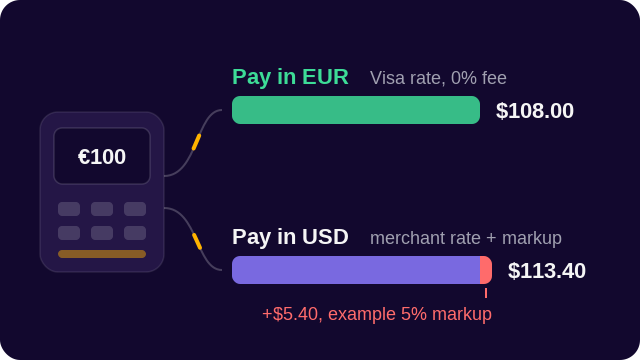
Choosing your card’s currency means the merchant’s side converts the price on the spot, at an exchange rate it sets. This is called dynamic currency conversion, or DCC. The merchant and its payment provider keep the markup built into that rate.
Choosing the local currency sends the payment through Visa as it is. Visa converts it at its own daily rate, and your issuer adds its foreign transaction fee, if it has one.
Why local is the better pick on an Aurum card
Aurum cards are held in USD and carry no cross-border fee, either for non-USD transactions or for merchants outside the US. Our fee schedule also adds no markup on foreign-currency settlement. So when you pay in local currency, the payment converts at Visa’s rate and nothing is added on top. With DCC, you pay the merchant’s markup to avoid a fee you would not have paid anyway.
Take a €100 dinner. If Visa’s rate that day makes it $108, that is what leaves your balance. With a 5% DCC markup, an example figure, the terminal would ask for $113.40 instead. You also agreed to that rate at the terminal, so the markup is hard to get back later.
How to spot it
- The screen offers to pay in your home currency, a guaranteed rate or no commission.
- The amount is shown in two currencies with an exchange rate next to it.
- The receipt mentions a conversion rate, a markup or DCC.
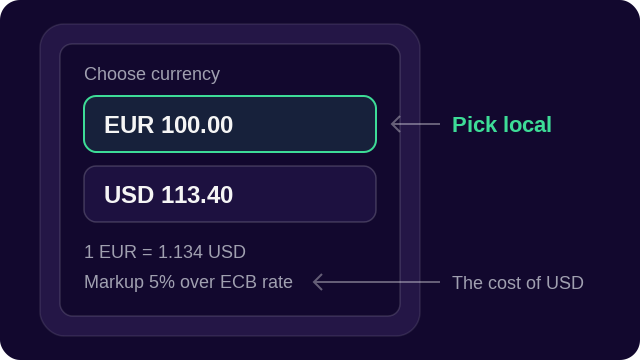
In the EU, the provider has to show the markup as a percentage over the European Central Bank’s reference rate before you pay. That percentage is the price of saying yes. Visa’s own guidance says the merchant should let you choose and must not pick for you. If the cashier has already picked USD, you can ask them to run the payment again in local currency.
Online checkouts can do the same. Some hotel, airline and shopping sites offer to charge you in USD at a rate they set, and the same logic applies. Many online services, AI tools and subscriptions already bill in USD, so there is nothing to convert.
When paying in USD can make sense
DCC buys you one thing: certainty. You know the exact USD amount before you pay. A local-currency payment converts when the merchant settles it, so the final amount can differ slightly from what you saw at the till. If your balance is close to the price, that can matter. A small buffer on your balance usually solves it more cheaply.
Refunds in another currency
A refund is converted again on the day it is processed. If the rate has moved since the purchase, the USD amount that comes back can be a little higher or lower than what you paid. That is normal, and Aurum adds no refund fee on top.
A quick checklist
- Pick the local currency at terminals and checkouts abroad.
- Two amounts and a rate on the screen mean DCC is on offer.
- If USD was picked for you, ask to run the payment again.
- Keep a small buffer on your balance for rate moves.